
Matrix Management
Matrix Management Concept
As a Line Manager, your Direct Reports may do work for other people such as a functional, matrix or project managers. These are called Matrix Managers in PerformanceHub.
As a Line Manager
- You can tell PerformanceHub who can matrix manage your direct reports
- You can give your direct report more than one matrix manager
- You can see all objectives a direct report has, including ones set by Matrix Managers
- If you remove a matrix manager from your direct report, the direct report keeps the objectives the matrix manager set. You will be assigned as the manager for the objectives and you can choose what to do with the old matrix objectives, including assigning them to a new matrix manager
- You can use the reviews done by the matrix manager as part of the appraisal
As a Matrix Manager
- You can set and review objectives for your matrixed team
- You can only see objectives you have set for your matrixed team member: you cannot see objectives set by their line manager or other matrix managers
Adding a Matrix Manager
To give your direct report a matrix manager, click on your name on the top right and select “Matrix Management” from the menu. This gets you to the Matrix Management set-up page:
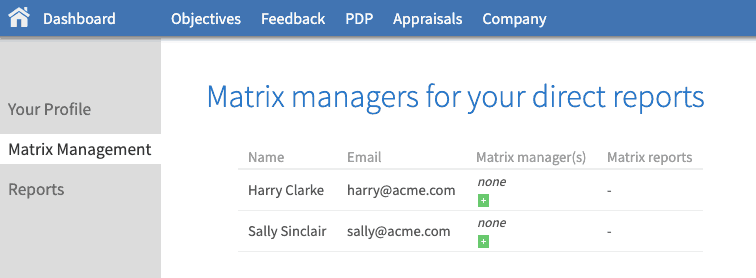
This page allows you to manage your direct reports’ matrix managers. It shows you a list of your direct reports, whether they have any matrix managers and whether they are matrix managers of others (their matrix reports).
To add a matrix manager to your direct report, click the green plus button and choose someone to add from the pop-up.
To remove a matrix manager, click the red cross button next to the manager you want to remove.
You can also see who has a matrix manager by looking at your team org chart.